Monday, April 24, 2017
Cara Mudah Reset Ink Run Out Epson L110 L300 L350 L355
Cara Mudah Reset Ink Run Out Epson L110 L300 L350 L355
mengenai masalah ini,, sebenarnya Printer Error tersebut menurut saya bukanlah suatu kerusakan yang perlu kita cemaskan, akan tetapi jenis error ini merupakan suatu peringatan yang memang sudah di program seperti itu adanya, dalam artian bahwa error tersebut merupakan suatu tanda atau peringatan untuk kita bahwa Kita harus Mengisi Tinta, atau harus kita Reset agar indicator bisa kembali normal seperti semula. Jadi anda tidak perlu khawatir.
Mengenai indicator Tinta, Seperti yang pernah saya utarakan di salah satu artikel terdahulu,, bahwa indicator yang anda lihat pada tampilan monitor anda,, itu tidaklah sesuai dengan kondisi sebenarnya, atau bisa kita katakana bahwa indicator tersebut tidak lah akurat sebagaimana mestinya,, bisa saja anda telah Mengisi Tinta dan Cartridge Sudah Penuh namun di tampilan layar monitor, Disitu tampilannya malah hampir Habis,, jadi kita tidak bisa mengambil patokan dari tampilan yang ada pada monitor tersebut,, walaupun pada dasarnya tinta yang ada pada cartridge, tidak berkurang sedikitpun.
Sampai disini saya rasa sahabat sudah cukup paham,, Nah kita Kembali ke topic. Selanjutnya,, Ink Run Out pada Epson L110 biasanya di tandai dengan munculnya peringatan seperti gambar di bawah ini..
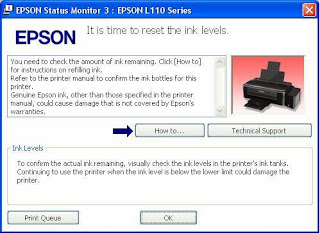
- Dengan di ikuti Lampu Led indicator tinta yang yang terus melotot yang tepatnya ada pada tombol Resume pada printer anda. Nah!! Bagaimana mengatas Hal tersebut?? Langkah-langkahnya Cukup mudah,, untuk itu silahkan anda mengikuti beberapa tahap di bawah ini.Pertama-tama silahkan anda menghidupkan Printer anda, Head Printer akan bergerak dengan menabrak ke kiri dan ke kanan, biasanya saat proses itu berlangsung, Led indicator pada Printer juga akan aktif juga, di situ anda hanya perlu menunggu sampai printer menyelesaikan proses Booting.
- Untuk tahap selanjutnya, Tekan pada Tombol Resume dan tahan selama 5 Detik (Bagian Tombol yang ada gambar kertasnya).
- Lepas Tombol Resume, kemudian tekan lagi tombol yang sama lalu tahan lagi selama 3 Detik lepas!! lagi
- Dengan Cepat!!!., Tekan lagi Tombol Resume
- Selamat Printer anda siap untuk anda gunakan kembali
Dengan menerapkan beberapa langkah di atas, saya harapkan anda bisa mengikutinya dengan langkah-langkah yang tepat,, untuk menerapkan langkah tersebut ada baiknya anda mengikutinya sambil mempraktekkannya secara langsung,, karena ada beberapa kasus yang menyatakan berhasil dan ada juga yang tidak, tentunya itu ada beberapa kesalahan saat mengikuti langkah-langkah yang saya sebutkan di atas, yang paling penting untuk anda perhatikan secara seksama adalah pada bagian Nomor 3 dan 4 Khususnya saat anda melepas Tombol Resume,, pastikan saat anda menekan tombol Resume (no.4) lakukan Secara Cepat jangan ada jeda..
Go to link Download

Wednesday, January 25, 2017
Check Out Latest Sony VAIO VPCS13SGX Review
Check Out Latest Sony VAIO VPCS13SGX Review

When it comes to laptops, there are a few things that immediately come to our minds. We prefer to have a laptop that should be seeking a unique, furnished with future technologies, to look fragile, but with a shock proof technology, the cover design and keyboard should be very attractive as well. Our desire never to stop here, and we still expect to have a powerful processor and enough memory, so our applications run smoothly and a large pantry. These are the basic requirements when everyone thinks we want to buy a new laptop.
On the market there a couple of laptops and notebooks that meet our requirements as competition is increasing day by day. Although companies that do business, but still, or perhaps a business strategy, think like a normal user and the design of the machine accordingly. Speaking of Sony VAIO VPCS13SGX, it is very designed a laptop that can be imagined. Talking about its exterior design, a wonderful cover art of writing with the silver VAIO black and white cover is not very shiny, but very innovative design. When you open the lid, what catches your eye attention LED backlight that shines with the framing of certain key characters and illuminates the keys are much more designed for finger comfort. And this is very convenient because it helps you to type in the dark where the light is low. This notebook is equipped with something most of us are not familiar s. May we not heard this term before they are called G-Sensor shock protection technology, it protects your computer from bumps and shocks while traveling, or while wearing this lightweight notebook
.When it comes to specs Sony VAIO VPCS13SGX will re-engage his attention towards him. This notebook comes with the latest Intel processor 2.66GHz with Turbo Boost Technology. This processor can boost speeds up to 2.93GHz with 3MB of cache memory shared as it has the power to process any faster than the eye blinks. Memory comes in 4GB and up to 8 GB. Furthermore, the storage space is 500GB SATA hard drive with 7200rpm.Grafi?ka card NVIDIA GeForce 310M with 512MB of its own memory, this is very easy to handle most of the gamming tasks and abilities to perform HD, Blu ray movies unbelievable.
These are the main communities and the price starts with the configuration of $ 1300 which does not allow complaining about anything. In the end, you have to make some this is not just a laptop offering these amazing features with these prices. Before making a final decision, you need to check several computers and implemented alongside the analysis.
Go to link Download