Showing posts with label 258. Show all posts
Showing posts with label 258. Show all posts
Sunday, June 25, 2017
Canon Printer Reset EEPROM MP Series 198 250 258 270 276 496 558 568 648
Canon Printer Reset EEPROM MP Series 198 250 258 270 276 496 558 568 648
How to Reset Canon MP198, MP 250, MP258, MP270, MP276, MP496, MP558, MP568 and MP648 All In One Printer.
Hello Canon AIO users. Ive received a few e-mails recently regarding troubleshooting for Canon printers. My trouble shooting guide, tips and tricks is based on what Ive experienced with. More or less, the tips is still valid, if you have the same or equivelant Canon MP Series printer models, then you could give it a try.
Today, I would like to share with you a more advance troubleshooting guide for your Canon MP Series All In One printer. The Canon Printer MP Series models stated above. I am not sure if it will troubleshoot other MP printer models, but my advise, with a little of Google-ing, by mix match technical specifications with the above printers and yours, if its compatible, why not, have a go.

Why my printer model not listed, but the images displayed looks exactly the same? Well, as Canon printers especially the Canon MP Series AIO printer is available all over the world, it is part of their marketing strategy, which is fairly different between one country to another. Certain countries will have the same model code while others, might have a slight change depending on the added features for that model. So, these printers will have the same outlook but a slightly different features inside. For your info, some of AIO printers uses almost the same internal boards for printing.
EEPROM Reset Tool
 This is a reset tool I found during mid 2009 and amazingly, it is still there and ready to download for personal use. This is an EEPROM Clear Tool for Canon MP198, MP 250, MP258, MP270, MP276, MP496, MP558, MP568 and MP648 All In One Printer and also acts as a resetter tool which will reset the basic printer features from your personal computer. Due to the initial design for Canon MP Series AIO printer for home and small office use, the resetter tool was specially developed to facilitate some P-XX ERRORS (cause from extensive printing).
Personally, Ive used this resetter tool on Canon MP 250, MP258, MP270 and MP278 AIO printers. But for the rest of the list, you probably have to find out since Ive not tested it before. The resetter tool is used for:
- Reset black ink counter.
- To reset colour ink counter
- To reset ink absorber counter
- Ink cleaning from PC button
- Check paper feed maintenance work from printer
- Prevent on screen low level ink warnings during printing jobs on your PC
This reset tool will not do the following:-
- Stop the low level blinking at printer
- Stop the orange blinking due to paper feed error
Note: There is NO resetting method to stop the low ink level blinking on your Canon MP Series printer. The alarm is designed based on the initial ink cartridge inserted from its first use. Canon MP Series printers uses print counts to check ink levels, not by a special level gauge built at ink cartridge. So, the low ink level blinking can be disregarded if you are using ink refills cartridges.
Step by step to Reset your Canon MP Series AIO Printer
Step by step to Reset your Canon MP Series AIO Printer
Step 1
Download MP Tool Reset tool ServiceTool_1050.zip (no password required-if ad does not automatically clear, press skip ads top right corner) here and extract. It comes in a .zip file and you do not have to install to your PC. Its safe and runs under Windows Vista, Windows Xp and Windows 7 (All Versions)
Step 2
Entering your printer into service mode.
- Turn the printer off if the printer power is on. Remove printer USB cable from your computer.
- While the printer is OFF, press and hold the Start/Stop button, if not, on other models press Resume/Cancel button.
- While still holding the Start/Stop button or Resume/Cancel button, press and hold the POWER button.
- When the POWER LED (green light) is lit, release the Start/Stop or Resume/Cancel button (still holding the POWER button).
- While still holding the power button, Press the Start/Stop button or Resume/Cancel button TWICE then Release the POWER button. Wait until LCD printer display 0 (zero) on the printer display counter.
- After the display is 0, attach the printer USB cable to your computer, it will detect a new device installed (its normal), and now you can go to the resetting steps.
Step 3
Resetting Ink counter on the Computer
Run “service_tool 1050.exe”. you can download the service tool software from the link given above.
After the steps completed, turn off the printer and then turn printer back on. If printer button does not switch off by pressing once, turn of the power cable. After turning on back again. your printer will automatically be out of service mode and ready for use.
Note: You can try to use its other features during STEP 3 eg. cleaning, check paper feed button, if it is compatible with your printer internal board.
Run “service_tool 1050.exe”. you can download the service tool software from the link given above.
- Confirm detected USB-port number on USB port column on your computer.
- Click “Main button” on Clear ink counter section. Make sure there are papers in the paper feed because the printer will print after the process is complete.
- Click on the “Clik MAIN” button - wait, then "EEPROM Clear" - wait, then "ËEPROM". The printer will print a sample check each time by clicking the previous buttons.
After the steps completed, turn off the printer and then turn printer back on. If printer button does not switch off by pressing once, turn of the power cable. After turning on back again. your printer will automatically be out of service mode and ready for use.
Note: You can try to use its other features during STEP 3 eg. cleaning, check paper feed button, if it is compatible with your printer internal board.
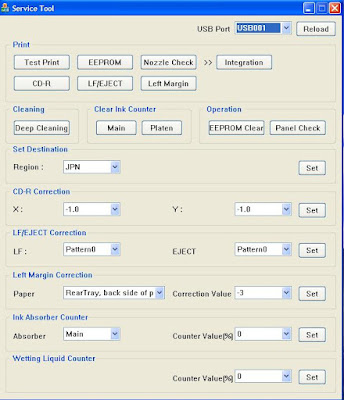 |
| Canon MP Series EEPROM Resetter Tool User Interface |
Special thanks to trickscollections and indoreset.for their initial remarks.
Glad to be of help and that is all for Canon Printer Reset EEPROM MP Siries 198/ 250/ 258/ 270/ 276/ 496/ 558/ 568/ 648.
Go to link Download

Tuesday, June 6, 2017
Cara Reset Canon MP258
Cara Reset Canon MP258

Indikasi awal :
Cara Reset Canon MP258 - Resetter Canon MP258. Ketika printer MP258 dinyalakan akan menunjukkan error P 07 di LCD panelnya.
Cara Resetter MP 258 Canon Terbaru dan Lolos Uji :
- Printer dalam keadaan mati dan kabel listrik terpasang.
- Tekan Tombol STOP/RESET dan tahan, kemudian tekan tombol POWER dan tahan.
- Tombol POWER masih ditekan, lepas tombol STOP/RESET, kemudian tekan tombol STOP/RESET 2 x dalam keadaan tombol power masih ditekan
- Lepas kedua tombol secara bersamaan.
- Printer akan berproses beberapa saat (agak lama), kemudian LCD Panel akan menunjukkan angka NOL (0)
- Komputer akan mendeteksi DEVICE BARU, Abaikan saja …..
- Keadaan ini menunjukkan printer MP258 dalam keadaan SERVICE MODE dan siap direset.
DOWNLOAD PROGRAM RESETTER MP258 di SINI.
- Exctract File Resetter MP258.
- Siapkan 2 kertas di printer (ini untuk print pada waktu proses reset)
- Jalankan program Resetter MP258.
- Klik “MAIN”, maka printer akan berproses, kemudian MP258 akan print satu halaman dengan tulisan ” D=000.0 “
- Klik ” EEPROM Clear “.
- Kemudian klik ” EEPROM “, dan printer akan print hasil Resetter MP258. Salah satu barisnya tulisannya sbb:“TPAGE(TTL=00000 COPY=00000)”
- Matikan Printer dengan menekan tombol POWER.
- Selesai…
Selamat mencoba …
Go to link Download
Thursday, April 13, 2017
Cara mereset Printer Canon MP 258 dengan Resetter Canon MP258 Terbaru
Cara mereset Printer Canon MP 258 dengan Resetter Canon MP258 Terbaru
Resetter Canon MP258 - Di hari kedua dari bulan suci Ramadhan 2012 1433 H ini ane akan membahas tentang bagaimana Cara mereset Printer Canon MP 258 dengan Resetter Canon MP258 yang sudah ane buktikan hasiatnya wkwkw. walaupun Cara mereset Printer Canon MP 258 dengan Resetter Canon MP258 untuk sebagian dari agan2n semua sudah agak basi untuk di simak hi..hi.. tapi ta apalah ane posting lagi disini toh masih banyak juga yang belum mengetahuinya buktinya barusan aja ane kedatangan seorang teman yang menanyakan bagaimana Cara mereset Printer Canon MP 258, oke langsung aja gan disimak.
Indikasi Pertama :
Indikasi Pertama :
- Ketika printer Canon MP258 dihidupkan akan memberi tanda error P 07 di LCD panelnya.
- Cara mereset Printer Canon MP 258 dengan Resetter Canon MP258 Yang Sudah ane Buktikan :
- Printer dalam keadaan mati dan kabel listrik tetap terpasang.
- Tekan Tombol STOP/RESET dan tahan, kemudian tekan tombol POWER dan tahan. (jangan dilepas dua-duanya)
- Tombol POWER masih dalam keadaan ditekan, lepas tombol STOP/RESET, kemudian tekan tombol STOP/RESET 2 x tombol power masih dalam keaadan ditekan.
- Lepas kedua tombol secara bersamaan.
- Printer akan berproses beberapa saat (agak lama), kemudian LCD Panel akan menunjukkan angka NOL (0)
- Komputer akan mendeteksi DEVICE BARU, biarin saja .....
- Keadaan ini menunjukkan printer MP258 dalam keadaan SERVICE MODE dan siap direset.
Kemudian agan-agan Download Software Resetter Canon MP258 disini untuk mempercepat download agan-agan pakai aja IDM atau software sejenis kalau belum punya download aja dulu IDM terbaru dimari. kalau udah di download Resetter Canon MP258 nya
- Exctract File Resetter MP258.
- Siapkan 2 kertas di printer (ini untuk print pada waktu proses reset)
- Jalankan program Resetter Canon MP258.

- Klik "MAIN", maka printer akan berproses, kemudian MP258 akan print satu halaman dengan tulisan " D=000.0 "

- Matikan Printer dengan menekan tombol POWER.
- Selesai.......
Selamat mencoba semoga berhasil
Go to link Download
Tuesday, March 14, 2017
Cara Resetter MP 258 error 5200
Cara Resetter MP 258 error 5200
Indikasi Awal :
Ketika MP 258 ini dinyalakan, printer kelihatan normal. Tapi setelah diperintah untuk print, maka error 5200 akan muncul. dan LCD menunjukkan error P08
Sebenarnya cara paling gampang adalah dengan mengganti Catrid Warnanya..
tapi ada cara lain, yaitu ....
Cara Resetter MP 258 error 5200 :
1. Printer dalam keadaan mati dan kabel listrik terpasang.
2. Tekan Tombol STOP/RESET dan tahan, kemudian tekan tombol POWER dan tahan.
3. Tombol POWER masih ditekan, lepas tombol STOP/RESET, kemudian tekan tombol STOP/RESET 2 x dalam keadaan tombol power masih ditekan.
4. Lepas kedua tombol secara bersamaan.
5. Printer akan berproses beberapa saat (agak lama), kemudian LCD Panel akan menunjukkan angka NOL (0)
6. Komputer akan mendeteksi DEVICE BARU, Abaikan saja .....
7. Tekan tombol power, maka printer akan mati.
8. Tekan lagi tombol power, maka printer akan nyala dan siap digunakan.
Jika kabel listrik tercabut, maka langkah di atas harus diulangi lagi.
Cara Lain Reset Canon MP258 error 5200 :
1. Hidupkan printer, dan printer akan terlihat normal.
2. Jalankan printer buat mencetak dokumen atau print test, maka error 5200 akan muncul.
3. Langsung cabut kabel listriknya tanpa menekan tombol on-off
4. Buka dan geser catridgenya ke tengah secara manual (tekan kait penguncinya warna putih di belakang head, agar catridge bisa ditarik ke tengah)
5. Cabut semua cartridge dan biarkan tutupnya tetap terbuka
6. Hidupkan printer, head akan bergerak menabrak kiri kanan karena tutupnya masih terbuka lalu akan berhenti di tengah.
7. Pasang kembali cartridge, dan tutup yang benar
8. Printer anda akan kembali normal.
(sumber : http://saptomotok.wordpress.com)
Go to link Download
Friday, October 14, 2016
Cara reset canon MP 258
Cara reset canon MP 258
Dalam kasus ini cara yang harus di lakukan adalah

- Matikan printer kabel power dalam keadaan terpasang
- Tekan tombol resume dan ditahan
- Tekan tombol power dan taha
- lepaskan tombol resume dan tekan lagi tombol resume sebnyak 2x
- lepaskan tombol resume dan power bersama sama
- jalankan program reseternya... bisa anda download di sini
- dan programnya seperti di bawah ini tampilanya
9. dan lakukan langkah seperti gambar di atas untuk mereset printer anda
10. tunggu printer untuk mencetak dengan tulisan D 0.0000
11 matikan printer dan hidupkan kembali printer anda
12. jika anda mengalami kasus seperti di bawah ini

13. Caranya hanya tekan tombol reset kurang dari 10 detik dan permasalahan printer anda akan selesai
Go to link Download
Subscribe to:
Posts (Atom)