Showing posts with label pro9000. Show all posts
Showing posts with label pro9000. Show all posts
Tuesday, March 14, 2017
Canon Pixma Pro9000
Canon Pixma Pro9000

PIXMA Pro9000 Printer Specifications
Printer
Print Speed (up to)
4" x 6" borderless: approximately 30 seconds1
8" x 10" borderless: approximately 51 seconds1
11" x 14": approximately 1 minute 23 seconds1
Number of Nozzles
Nozzle Text: 768 x 8 colors (Photo Bk, C, M, Y, PC, PM, R, G)
Total: 6,144
Print Resolution (up to)
Black: 4800 x 2400 dpi2
Color: 4800 x 2400 dpi2
OS Compatibility
Windows® XP/2000/Me/98 and Mac OS X v.10.2.8 to 10.4.x3
Standard Interface
USB 2.0 Hi-Speed4 and Direct Print Port (cables not included)
Ink Droplet Size
2 picoliters
Buffer/Ram
42KB
Paper Sizes
Letter, Legal, 4"x 6", 4"x 8", 5"x 7", 8"x 10", 13"x 19", U.S. #10 Envelopes
Paper Handling
Paper Handling text: Top Feeding (ASF); Front Feeding (Single sheet up to 1.2mm paper thickness)
Noise Level (Approx.)
37 dB(A) in the best quality mode
Physical Dimensions
26.0"(W) x 7.6"(H) x 14.0"(D)
Weight
30.8 lbs.
Power Source
120V AC, 60Hz
Warranty
Toll-free technical phone support plus 1-year limited warranty4
Software Included
CD-ROM including Printer Driver, Setup Software and Users Guide, Electronic Photo Application Guide, Electronic Users Guide, e-registration, Easy-PhotoPrint(Windows/Mac), Easy-PhotoPrint Pro (Windows/Mac), PhotoRecord® (Windows),Easy-WebPrint (Windows only, requires Microsoft® Internet Explorer version 5.5, version 6.0 recommended)5
Specifications are subject to change without notice. All viewscreen and printer output images are simulated.
1PPM print speeds are based on the highest printer driver mode. Photo print speeds based on default mode driver settings printing an 11" x 14" photo using Canon 13" x 19" Photo Paper Pro. Print speed will vary based on system configuration, software, document complexity, print mode and page coverage
2Resolution may vary based on driver setting. Maximum resolution of 4800 x 1200 dpi used at the bottom edge of the page. Ink droplets can be placed with a horizontal pitch of 1/4800 inch at minimum.
3USB 2.0 Hi-Speed requires Windows XP, 2000 or Mac OS X operating systems. For Windows 98, Me and Mac OS X v.10.2 to 10.2.6 operating systems, the printer will operate at USB 1.1 specifications.
4System requirements vary by application.
5Warranty programs are subject to certain conditions and restrictions. See www.canontechsupport.com for details.
(Specifications as represented by the manufacturer)
# Driver Canon PIXMA IP100 Download
# Driver Canon PIXMA Pro9000 Download
# Driver Canon PIXMA Pro9500 Download
Go to link Download

Saturday, October 22, 2016
Canon PIXMA Pro9000 Mark II Driver Download
Canon PIXMA Pro9000 Mark II Driver Download
Canon PIXMA Pro9000 Mark II Driver Download
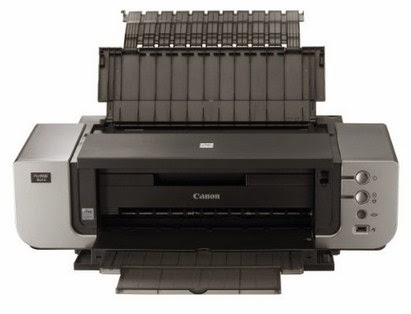 |
| Canon PIXMA Pro9000 Mark II |
Canon PIXMA Pro9000 Mark II Driver Download - The Canon PIXMA Pro9000 Mark II possesses the actual functionality and technology youll need for high-quality output in order to be the professional photographer you’ve always desired to be. Its 8-color ink system widens your color palette along with superior Easy-PhotoPrint Pro computer software to fine melody your prints in addition Ambient Light Correction which optimizes color output to check the specified lighting condition youll display in. Regarding true printers connected with photos, this brilliant process combines FINE Technological know-how with genuine Cannon papers and inks which usually promotes outstanding shade vividness and long-lasting prints for approximately 100 years when stored within the archival quality scrapbook.
This level connected with quality is achieved by 4800 x 1200 maximum color dpi because of Canon Full-photolithography Ink jet Nozzle Engineering (FINE) having a patented printhead firing ink droplets no more than 2pl. This delivers specialized quality and detail to your photos. This 8-color dye-based process features Photo Cyan, Photo Magenta in addition to Red ink tanks intended for incredible colors getting your images your. The ChromaLife100 system combines some great benefits of genuine Canon dye-based ink and photo paper with Manual head technology to make long-lasting, beautiful prints having a wide color range for vivid pigmentation and high glossiness.
This level connected with quality is achieved by 4800 x 1200 maximum color dpi because of Canon Full-photolithography Ink jet Nozzle Engineering (FINE) having a patented printhead firing ink droplets no more than 2pl. This delivers specialized quality and detail to your photos. This 8-color dye-based process features Photo Cyan, Photo Magenta in addition to Red ink tanks intended for incredible colors getting your images your. The ChromaLife100 system combines some great benefits of genuine Canon dye-based ink and photo paper with Manual head technology to make long-lasting, beautiful prints having a wide color range for vivid pigmentation and high glossiness.
Canon PIXMA Pro9000 Mark II That driver supports for :
- Windows 8 (32bit, 64bit)
- windows 8. 1 (32bit, 64bit)
- windows 7 (32bit, 64bit)
- windows Vista (32bit, 64bit)
- Macintosh
- Mac Os Times
- Linux.
Canon PIXMA Pro9000 Mark II Driver Download
How to install the printer driver :
- Open the driver file that you downloaded it
- Then double click on the file
- Then choose the language you want
- Then you can follow the instructions given
- completed
How to unistal the printer driver :
- Click on the start menu, then click control panel and select the program unistal
- Next follow the directions and steps which appear.
- Wait a while
- Then the printer driver will be ready to be deleted
Driver Download For Windows :
Driver | Download | |
Windows XP, Windows Vista | Download Here | |
Windows 8.1, Windows 8, Windows 7 | Download Here | |
Driver Download For Mac OS :
Driver | Download | |
Mac OS | Download Here | |
Driver Download For Linux :
Driver | Download | |
Linux | Download Here | |
Canon PIXMA Pro9000 Mark II Driver Download
Go to link Download
Subscribe to:
Posts (Atom)